
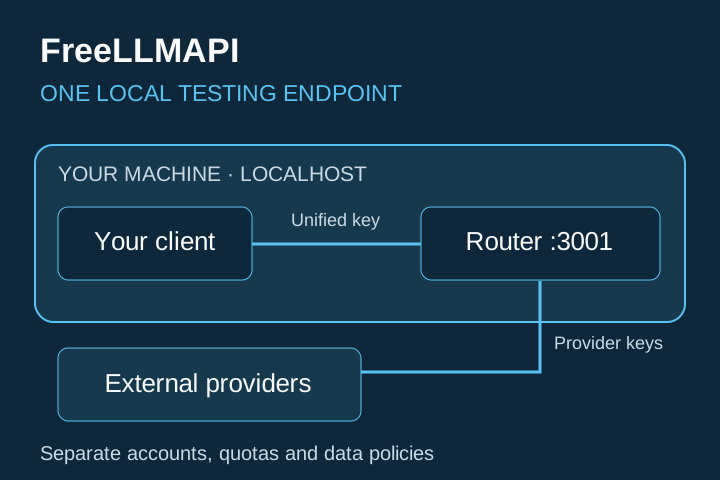
Set up one local, OpenAI-compatible endpoint for controlled experiments across the providers you choose to connect.
FreeLLMAPI is an MIT-licensed, local-first router for personal experimentation. Its project page lists 34 providers and 635 free provider/model endpoints. These changing catalog claims do not promise that every endpoint will be available, work in your region, or remain free.
Your finished result
You will have:
- FreeLLMAPI running locally with Docker
- at least one provider key added through the local dashboard
- one unified key for your client
- one successful test request, with the serving provider checked
You need Docker, a terminal, and an API key from at least one supported provider. Provider accounts, quotas, terms, data handling, and availability remain separate.
1. Inspect, then install
The project publishes this convenience installer:
curl -fsSL https://freellmapi.co/install.sh | bashPiping a remote script into a shell lets it run commands on your machine. Open the installer and review it first. This command was verified against the project documentation but not executed for this guide.
If you prefer to work from the public repository, the source article provides this block:
git clone https://github.com/tashfeenahmed/freellmapi
cd freellmapi
docker compose up -d
Before starting, inspect the repository and create .env as described in the current installation documentation. The Compose file loads .env, uses a Docker volume, binds to localhost by default, and restarts unless stopped.
2. Add only the provider access you need
Open http://localhost:3001 in your browser. Create the local server account if prompted, then add one provider key on the Keys page. Copy the unified FreeLLMAPI key shown by the dashboard.
Start with a low-risk experiment. Do not submit confidential, regulated, client, or production data. Requests travel to the serving provider, so its current terms and privacy controls apply.
Keep the service bound to localhost. The project's current Compose file explicitly describes the router as single-user and warns against exposing it to the internet. Never publish the dashboard, database, or API port without a deliberate security design.
3. Connect an OpenAI-compatible client
The source article used these settings:
OPENAI_BASE_URL = http://localhost:8080/v1
OPENAI_API_KEY  = your-freellmapi-key
Current-version correction: the repository now documents http://localhost:3001/v1 as the default base URL. Keep the variable names your client expects, replace the example key with your unified dashboard key, and use port 3001 unless you deliberately changed the host port in .env.
Do not paste a provider key into the client. The client should receive only the unified FreeLLMAPI key. Store secrets in the client's credential or environment system, not in screenshots, prompts, shared files, or source control.
4. Run one controlled test
The source article supplied this request:
curl http://localhost:8080/v1/chat/completions \
  -H "Authorization: Bearer your-freellmapi-key" \
  -d '{"model":"auto","messages":[{"role":"user","content":"hello"}]}'
For the current default installation, change only the request URL to http://localhost:3001/v1/chat/completions and replace the placeholder key. Keep the prompt harmless. A successful response confirms that the router, unified key, selected provider, and request format work together.
Then inspect the response header or local dashboard to see which provider and model actually served the request. auto delegates selection to the router, so the result can vary as availability and limits change.
Quick quality check
- [ ] The dashboard opens only on the intended local address.
- [ ] At least one provider key passes the project's health check.
- [ ] The client uses the unified key, not an upstream provider key.
- [ ] The base URL matches the port actually configured.
- [ ] A harmless request succeeds and the serving provider is visible.
- [ ] No confidential or client data was used.
- [ ] Failure, latency, and model quality are treated as variable.
If the request fails, first check container health and logs, then confirm the configured port, unified key, provider-key status, and remaining provider quota. Do not solve an authentication error by exposing the local service publicly.
Know the boundary
This setup is useful for learning, prompt tests, and small personal prototypes. The project documents variable latency, changing free-tier quotas, no service-level agreement, and no frontier-model guarantee. The free catalog can also lag the live catalog. Do not use endpoint counts or estimated aggregate token capacity as a personal allowance or reliability forecast.
If you want to move from a small local test to documented, testable automation services with QA, fallback, delivery, and maintenance controls, continue with The 90-Day Automation Income System. It does not guarantee a client, revenue, return on investment, or uninterrupted provider access.
Official sources
Verified on 10 September 2026: